From Handwritten Exercise Log to Fitness App: Choosing What to Remember
A handwritten exercise log or fitness app can help you recall useful details without turning movement into paperwork. Choose a format that fits.
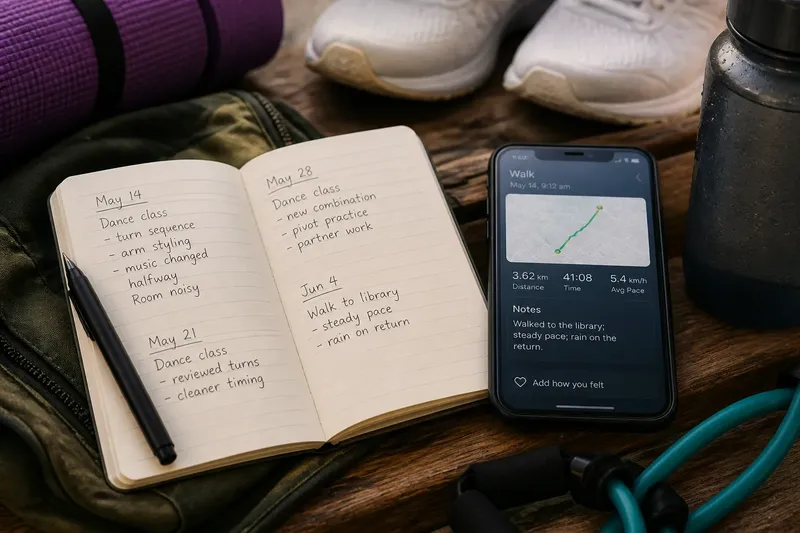
The common mistake with a handwritten exercise log or fitness app is asking it to remember everything. The result is often either a notebook full of details nobody revisits or an app that makes recording a walk feel like filing a report.
An exercise record is not simply a choice between paper and screen. It is a decision about which parts of a session deserve to travel into the future: the route, the movement, the setting, or a detail that may shape what you do next. The right format depends on what you want to recall, and how you prefer to leave that reminder.
What should an exercise log help you remember?
Start with one useful question. You might want to recall which pool drills you practised, what equipment you used at the gym, or why a familiar walking route felt different. A short note can preserve context that memory tends to smooth over.
Keep the record descriptive rather than judgemental. “Walked to the library; steady pace; rain on the return” gives a future reader—the same person, inconveniently—a few distinct details. “Good session” offers a verdict, but little to retrieve.
Different activities call for different cues. A dancer may want the class combination; someone using resistance bands may note the movements; a cyclist may care about the route or company. There is no need to turn each activity into a set of metrics if those numbers do not answer a question you have.
When does a handwritten exercise log work better?
Paper is quick to open and indifferent to battery life, logins and app permissions. A pocket notebook, ruled diary or index card gives you room to write in your own terms. It can suit activities that do not fit neatly into preset categories.
Its weakness is retrieval. If you want to compare every entry about a particular class, you may have to turn pages. A notebook left in another bag is also a fine record of an event you can no longer remember clearly.
A wall calendar or paper planner serves a narrower purpose. It makes attendance visible, but a mark on Tuesday cannot explain whether the session was a dance class, a rushed gym visit or a walk taken to clear your head. Use it when the date is the information you want; add a note when the activity matters too.
What does a fitness app add?
A fitness app may offer search, filters, route maps, saved notes or links to a watch. Those features can make older entries easier to find, especially when you want to look for a specific activity or place.
The app also brings its own assumptions. Its fields and labels are designed in advance. If they suit your activity, they can make entries consistent. If they do not, choosing a category can become more work than writing what happened.
Automatic capture has a similar boundary. A route map can show where you went, but not whether it was a commute or a social outing. A graph cannot explain that a class felt confusing because the room was noisy. Use the device trace as a record of what it can capture, then add a plain-language note if context matters.
How can you decide which record to keep?
Use the following checks before settling on a format. For each one, decide what you will do if the record passes or fails the test.
- Time to make an entry: After a session, write the activity and one useful detail in your chosen tool. If that is quick enough to repeat, keep the format; if it feels like paperwork, remove fields or switch to a pocket notebook.
- Fit for your activity: Try entering a class, walk or strength session that matters to you. If the available labels describe it accurately, keep them; if they do not, use a free-text note or choose a tool with custom entries.
- Finding old notes: Search or browse for a past session you would want to recall. If you can locate it without guesswork, keep the retrieval method; if not, add dates and consistent activity names or move to a searchable app.
- Useful level of detail: Read an old entry and ask whether it identifies what happened. If it does, keep that amount of detail; if it says only “good” or “done,” add one concrete cue such as route, equipment or class focus.
- Automatic data: Check what your phone or watch records and what the app displays. If the trace answers a question you care about, retain that feature; if it distracts from the session, turn it off where possible or record only a short note.
- Privacy settings: Review the app’s permissions and sharing options before entering personal details. If the settings fit your comfort level, proceed; if not, restrict access, use a different service or keep the record offline.
Say you attend a weekly dance class and want to remember which combination you practised. Your starting point is a phone with a calendar app and a pocket notebook; the calendar records dates but has no useful place for class notes. After class, you write the date and “turn sequence; music changed halfway” in the notebook, then look for that entry before the next session. The resulting answer is specific enough to remind you what the class covered; the trade-off is that you must carry and browse the notebook rather than search a screen.
Which exercise log fits each kind of record?
A useful comparison is not about which tool is best in the abstract. It is about what each one makes easy, and what it leaves for you to do.
- Pocket notebook: Choose it if you want open-ended notes without a device; if finding old entries becomes awkward, add an index or use a searchable format.
- Calendar: Choose it if you mainly need dates and attendance; if you need to recall session content, add a brief note or use a separate log.
- Spreadsheet: Choose it if you want custom columns and can maintain them; if updating the structure becomes a chore, simplify the columns or switch to free-text notes.
- Fitness app: Choose it if search, filters or device links help answer your questions; if its categories misrepresent your activity, use its note field or change tools.
- Watch or tracker: Choose it if automatic capture is useful; if the recorded trace lacks the context you need, add a personal note or leave the device at home for that session.
For connected devices and apps, check current privacy settings and product instructions directly. Features and data controls vary, so do not assume one service handles personal information in the same way as another.
What should you ask before choosing an exercise log?
Is a paper exercise log better than a fitness app?
Paper works well for quick, open-ended notes, while an app can help with searching, sorting and device-linked records. Choose according to the task you want the record to perform, not the novelty of the tool.
What should I write in an exercise log?
Note the activity and one or two details that will help you recognise it later. These might be a route, piece of equipment, class focus or how the session felt.
Can a fitness app record every kind of exercise?
Apps vary, and preset categories may not describe every activity well. A free-text note can preserve what you actually did without forcing it into an unsuitable label.
Do I need to record every workout?
No. Keep entries when they help you remember or reflect on your activity; a missing note does not erase the session.
How can an exercise log stay useful?
Keep the record focused on recall, not compliance. A handwritten exercise log or fitness app earns its place when it helps answer a question you genuinely ask, such as what you practised or which route you took. If the tool begins to compete with the activity for attention, remove fields, change format or stop recording details you never use.
One practical test is to reopen an old entry before your next session. If it gives you a useful cue, the record is doing its job. If it merely confirms that you once exercised, the calendar has already supplied the headline.